
Manual deployments have a special kind of dread: the checklist nobody fully trusts, the one step someone forgets at 6 p.m. on a Friday, the rollback that exists only in theory. CI/CD pipeline automation removes that drama by turning every release into the same scripted, testable process. Code is integrated continuously, verified automatically, and delivered through a pipeline that behaves identically every time. If your team still ships by hand, this guide walks through CI/CD pipeline automation in practical terms: the stages a healthy pipeline needs, how to handle secrets and environments, and the habits that keep releases boring in the best possible way.
The Stages of a Healthy Pipeline
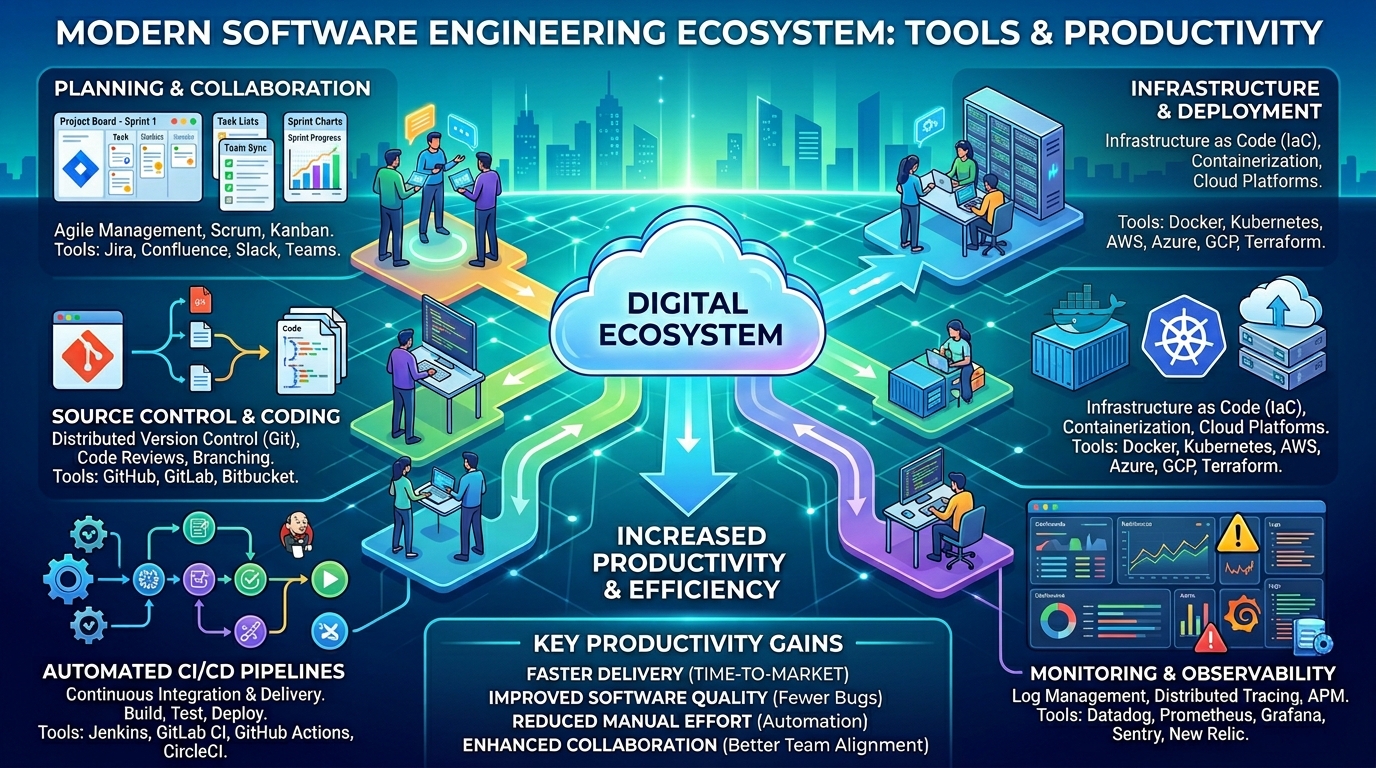
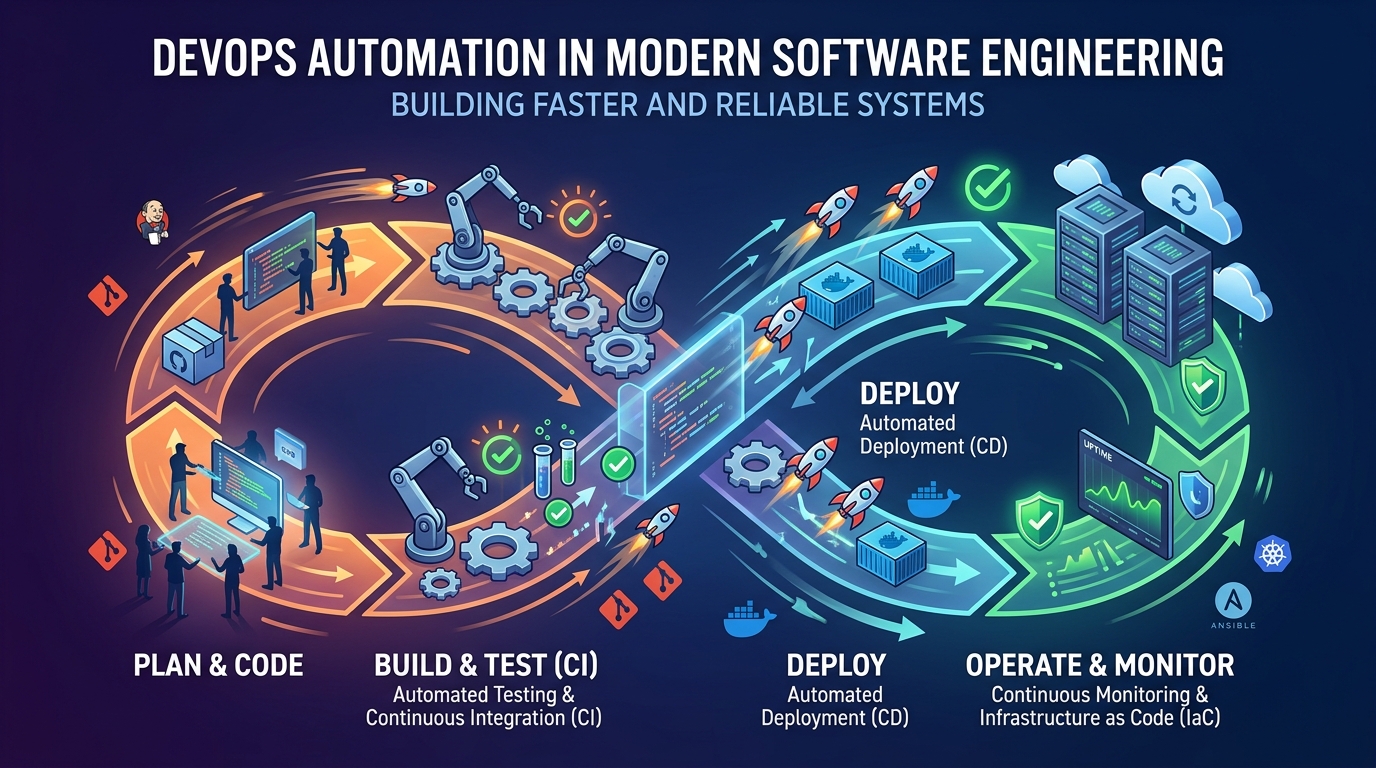
A pipeline begins the moment a developer pushes code. The first stage builds the application and fails fast if it does not compile or package cleanly. Next come automated tests, ordered from fastest to slowest: unit tests in seconds, integration tests in minutes, and end-to-end checks only where they earn their keep. Linting and dependency scanning belong early too, catching problems while the context is still fresh in the author’s mind. Each stage is a gate; a failure stops the line and notifies the team immediately, because a red pipeline is information, not embarrassment.
One stage that earns its place quickly is automated code review support: formatters that end style arguments forever, static analysis that spots unsafe patterns, and bots that comment on pull requests with test coverage deltas. None of these replace human review, but they clear the mechanical noise so reviewers can spend their attention on design and correctness. Similarly, a staging deployment on every merge, even a lightweight ephemeral one per pull request, lets product managers and testers click through changes in a realistic environment before release day, which surfaces integration surprises while they are still cheap to fix.
After tests pass, the pipeline builds a single deployable artifact, an image or package that is promoted unchanged through staging and production. This “build once, promote many times” rule is the backbone of trustworthy CI/CD pipeline automation, since it guarantees that what you tested is exactly what your users receive.
Environments, Secrets, and Access Control
Pipelines need credentials: registry passwords, cloud keys, signing certificates. Storing them in the repository is a classic and dangerous shortcut. Use your CI platform’s encrypted secrets store, scope each credential to the environments that truly need it, and rotate them on a schedule. The same discipline described in guides to account security basics applies to automation: unique identities per purpose, minimal permissions, and no shared logins whose usage nobody can trace.
Human access deserves equal care. The laptops and personal accounts that approve deployments and manage pipeline settings are part of your security perimeter, and building better habits with device security, such as disk encryption, screen locks, and hardware keys for admin accounts, meaningfully reduces the chance that a stolen device becomes a production incident. Require two-factor authentication for everyone who can modify the pipeline itself.
Deployment Strategies That Limit Damage
Automation does not eliminate bad releases; it contains them. Rolling deployments replace instances gradually, so a faulty version affects a shrinking minority while health checks decide whether to continue. Blue-green deployments keep the previous version warm and switch traffic back instantly if metrics degrade. Canary releases go further, sending a small percentage of real traffic to the new version first. Whichever strategy you choose, pair it with automated rollback triggers based on error rates and latency, so the pipeline can retreat without waiting for a human to wake up.
Feature flags complement these strategies by separating deployment from release. Code can ship dark, then be enabled for staff, a small cohort, and finally everyone. When something misbehaves, turning off a flag is faster and safer than redeploying.
Common Pitfalls When Teams Adopt Automation
The most frequent failure is automating everything at once. Teams attempt a big-bang migration, stall for months, and lose faith in the whole idea. A thinner slice, one service, one branch, one deploy target, proves the value and surfaces the organization’s real obstacles, which are usually about permissions and ownership rather than technology. A second pitfall is treating the pipeline as a side project owned by nobody. Pipelines are production systems; they need an owner, monitoring, and occasional refactoring like any other codebase, because a neglected pipeline quietly becomes the flaky bottleneck everyone routes around.
Skipping the staging environment’s discipline is a third trap. If staging data and configuration drift far from production, green pipelines stop meaning anything, and the first honest test of a release happens in front of users. Keep environments as similar as your budget allows, and seed staging with realistic, anonymized data. Finally, beware of approval steps that exist only because they always have. An automated pipeline with a manual checkbox that one tired person clicks without looking provides neither speed nor safety. Replace ceremonial approvals with automated checks and genuine review gates held early, where they catch real problems.
Keeping the Pipeline Fast and Trusted
A pipeline that takes forty-five minutes will be bypassed, and a bypassed pipeline is worse than none. Cache dependencies aggressively, run test suites in parallel, and split slow end-to-end suites so only the critical paths block merges. Track pipeline duration as a metric with an owner, the same way you track production latency. Post the current pipeline time somewhere the whole team can see it, in the chat channel or on a dashboard, because visible numbers invite small optimizations from everyone, and a minute saved per run compounds across hundreds of runs each month. Flaky tests deserve special ruthlessness: quarantine them the day they appear, fix or delete them within the week, because a pipeline that cries wolf trains the whole team to ignore real failures.
Start small if you must: automate the build and the unit tests this week, deployments next month. Each stage you add removes a manual ritual and a category of human error. Within a quarter, CI/CD pipeline automation becomes the way your team breathes, and releases turn from events into non-events, which is exactly what good engineering feels like.