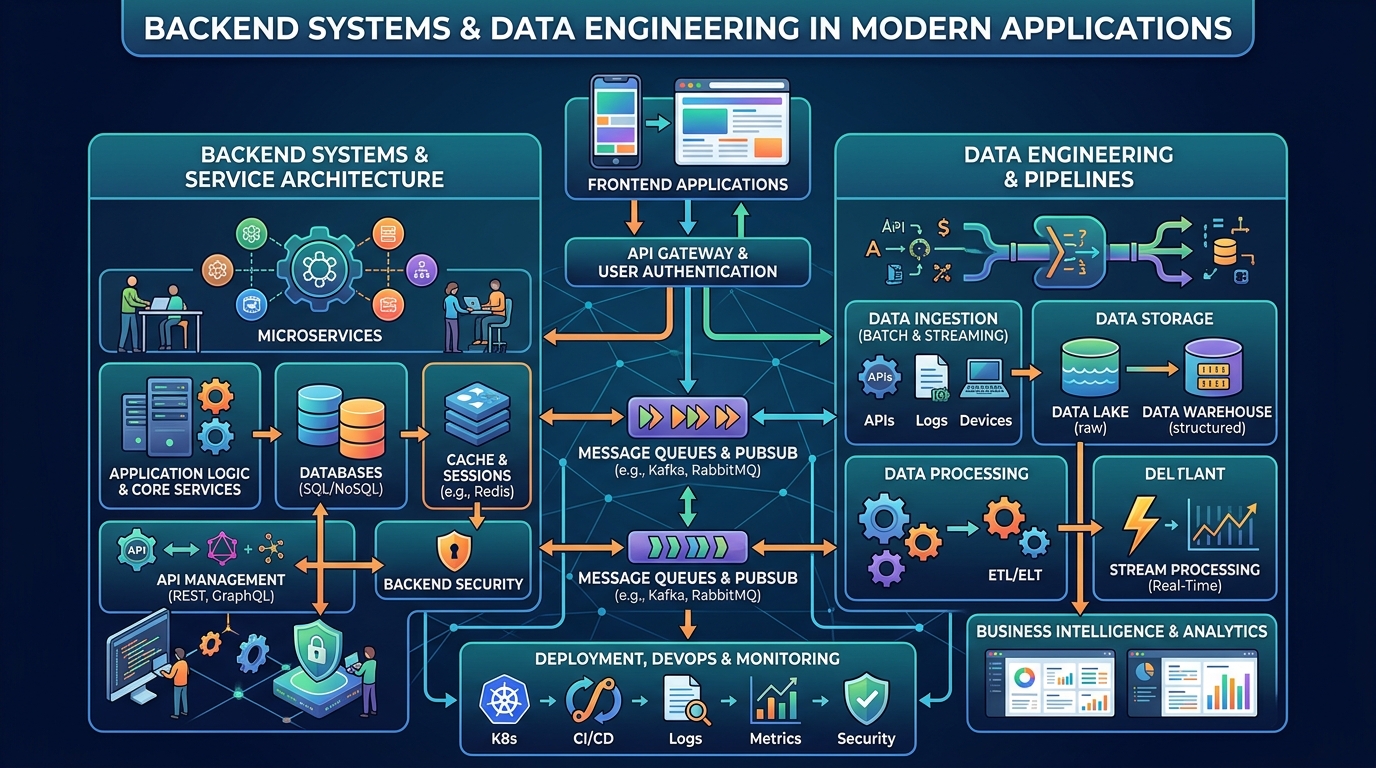


Every successful application eventually faces the same happy problem: more users than the original architecture can comfortably serve. Scalable system design is the discipline of preparing for that moment without overbuilding on day one. It is not about copying the architecture of giant companies; it is about understanding a handful of principles, load, state, caching, and failure, and applying them in the right order as your product grows. This guide explains scalable system design in practical terms, so you can make decisions that keep your application fast and reliable at ten thousand users and still make sense at ten million.
Scale Out, Not Just Up
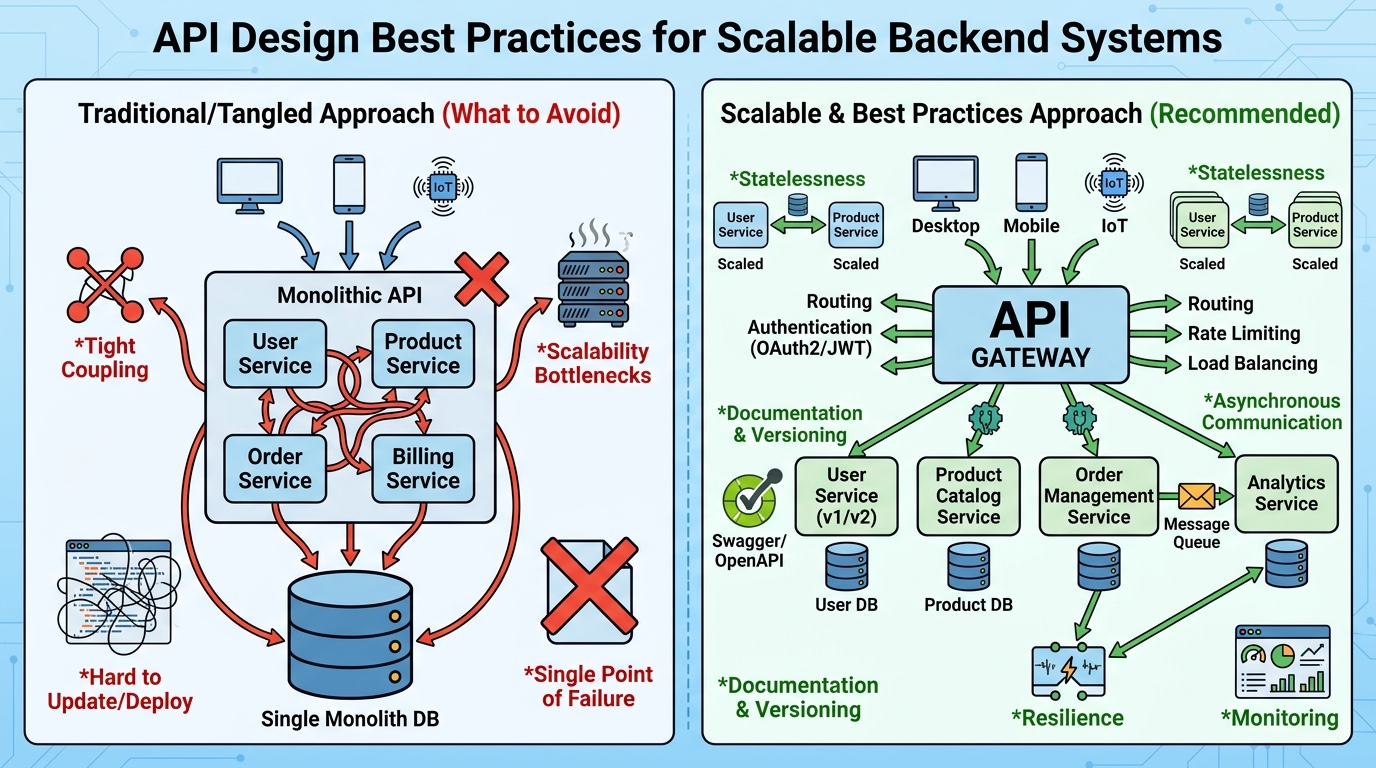
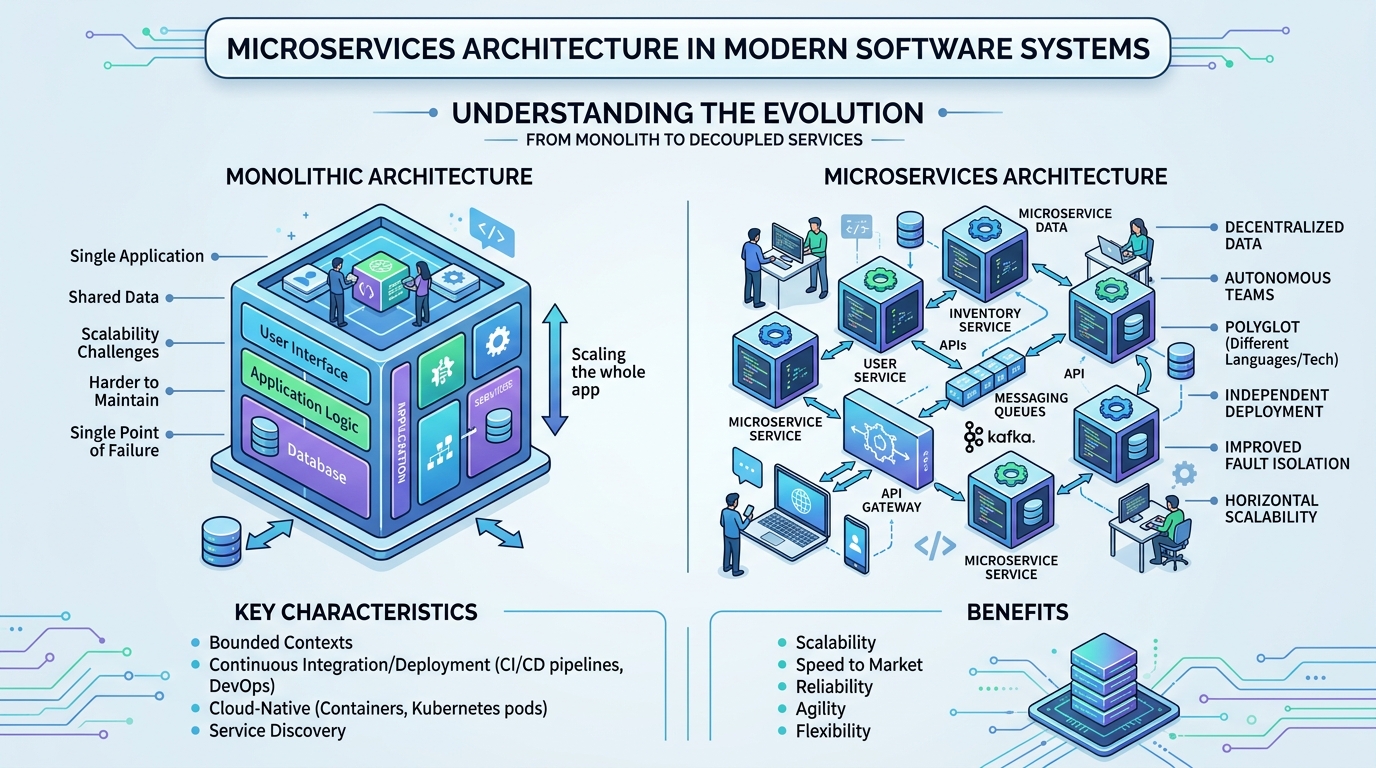
The first fork in scalable system design is vertical versus horizontal scaling. Vertical scaling means a bigger machine: more CPU, more memory. It is simple and works until it suddenly does not, and the largest instances are expensive and still a single point of failure. Horizontal scaling means more machines sharing the work, which is only possible when your application servers are stateless. Keep session data, uploaded files, and caches outside the application process, in shared stores designed for them, and any server can handle any request. That single decision unlocks almost everything else in this guide.
Statelessness also changes how you think about state changes in real time. Consider how a card game application must reconcile what every player has seen; developers who work on tracking the cards you see to make decisions understand that consistent, shared state is the hard part, not the interface. In backend terms, that shared truth belongs in your database or a dedicated state store, never in one server’s memory.
Caching With Clear Rules
Caching is the cheapest performance you will ever buy, and the easiest to get subtly wrong. The rule is simple: cache data that is read often, changes rarely, and is expensive to compute. Product catalogs, configuration, and public content are ideal; account balances and inventory counts are dangerous. Every cache entry needs an expiration strategy, either a time-to-live or explicit invalidation when the underlying data changes, decided before the cache ships, not after the first stale-data bug report. Also decide in advance what happens when the cache itself is unavailable: falling back to the database is slower but safe, while failing requests outright turns a caching hiccup into an outage.
A related decision is where sessions and long-lived connections live. WebSocket feeds, chat, and live dashboards hold connections open for minutes or hours, which breaks the assumption that any server can take any request and finish in milliseconds. The standard answer is a connection tier: dedicated gateway nodes hold the sockets, while the business logic behind them stays stateless and horizontally scaled, communicating through a pub/sub channel. Planning for this early matters, because retrofitting real-time features onto an architecture that assumed short requests is one of the more painful migrations a growing team can schedule.
Place caches at the right layer. A content delivery network absorbs static assets and public pages at the edge. An in-memory store such as Redis serves hot application data. Even a short-lived in-process cache can shield your database from repeated identical lookups within a single request cycle. Measure hit ratios; a cache that rarely hits is just extra complexity wearing a costume.
Queues, Backpressure, and Graceful Degradation
Not every task must happen inside the request that triggered it. Sending email, generating reports, resizing images, and syncing third-party systems belong on background queues. Queues smooth traffic spikes into a steady stream your workers can handle, and they give you backpressure: when the queue grows, you know precisely where the system is straining. Pair queues with retries that use exponential backoff and a dead-letter queue for poison messages, so one malformed job cannot loop forever.
Equally important is deciding in advance what your application may drop under extreme load. Recommendations can fail silently, reviews can load late, but checkout and login must not. Designing these degradation paths ahead of time, and being honest about connection problems and mistakes to avoid when services are saturated, turns potential outages into brief, partial slowdowns that most users never notice.
Load Testing: Prove It Before Your Users Do
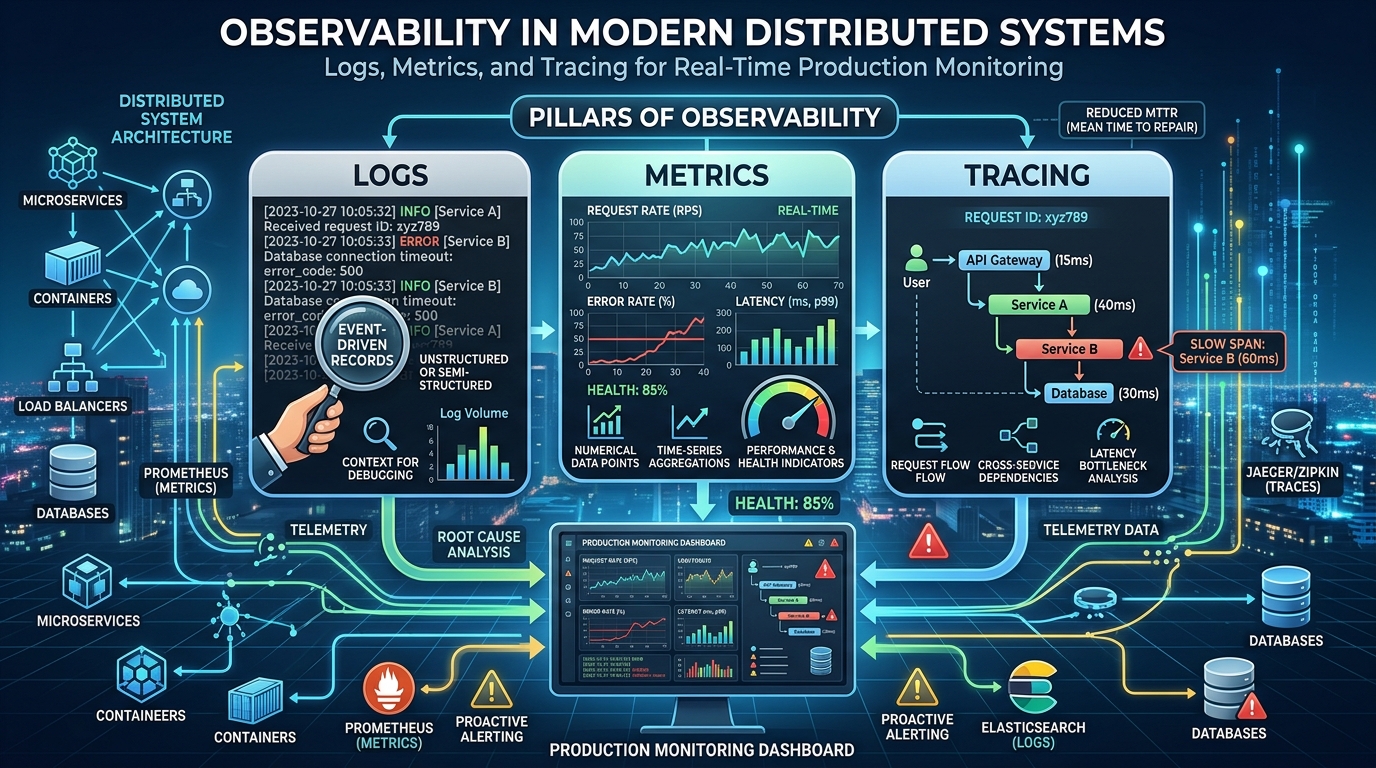
Design principles stay theoretical until you test them against realistic pressure. Load testing means simulating the traffic you hope to have, and a little beyond it, to find where the system bends first. Start by modeling real behavior: the ratio of reads to writes, the handful of endpoints that dominate traffic, and the daily peaks rather than the average. Then ramp gradually while watching the metrics that matter, response latency at the ninety-fifth percentile, error rates, queue depths, and database load. The bottleneck you find is rarely the one you predicted, which is precisely the value of the exercise.
Make load tests a recurring habit instead of a launch-week ritual. Run a modest version after significant infrastructure changes and a full rehearsal before predictable surges such as product launches or seasonal peaks. Record the results alongside your architecture decisions, so the team can see capacity as a measured property rather than a hope. Teams that know, with evidence, that they can handle three times their current traffic sleep better and make calmer decisions when a real spike arrives unannounced.
Data Growth and Partitioning
Sooner or later the database becomes the bottleneck, because data is the one thing you cannot simply add servers to. First exhaust the honest wins: indexing, query tuning, read replicas for reporting and read-heavy traffic. When a single table outgrows one machine, partition it by a natural key such as tenant, region, or time. Sharding is powerful but expensive in complexity, so treat it as the last step, not the first. Many companies run for years on one well-tuned primary with replicas because they delayed this decision wisely.
Scalable system design is ultimately a habit of thinking: identify the bottleneck, measure it, fix the simplest thing that helps, and repeat. Teams that work this way rarely need heroic rewrites, and their systems grow as calmly as their user bases do.