Introduction to DevOps Automation
What DevOps Automation Means
DevOps automation refers to using tools and scripts to streamline, optimize, and automate the processes involved in software development and operations. This includes tasks like building code, testing, deploying applications, monitoring environments, and managing infrastructure—without manual intervention.
Automation ensures that repetitive tasks are handled consistently, quickly, and reliably.
Why Automation Is Important for Beginners
For beginners, DevOps can feel overwhelming because it involves many different steps and tools. Automation simplifies this learning curve by reducing manual tasks and allowing learners to focus on understanding concepts instead of repeating routine work.
It helps beginners adopt DevOps practices faster and builds confidence through predictable, automated workflows.
Key Benefits of Early Automation
- Faster Development & Deployment: Automating builds, testing, and deployments speeds up the software delivery cycle.
- Reduced Human Errors: Automated scripts ensure consistent results, lowering the risk of mistakes.
- Improved Collaboration: Teams share tools and workflows, making collaboration between developers and operations smoother.
- Better Learning & Skill Growth: Beginners can learn DevOps tools through hands-on automated setups.
- Higher Productivity: Automation frees time to focus on coding, strategy, and innovation rather than repetitive tasks.
- Scalability: Automated processes grow with the project, making it easier to handle more features, users, and environments.
Understanding the DevOps Lifecycle
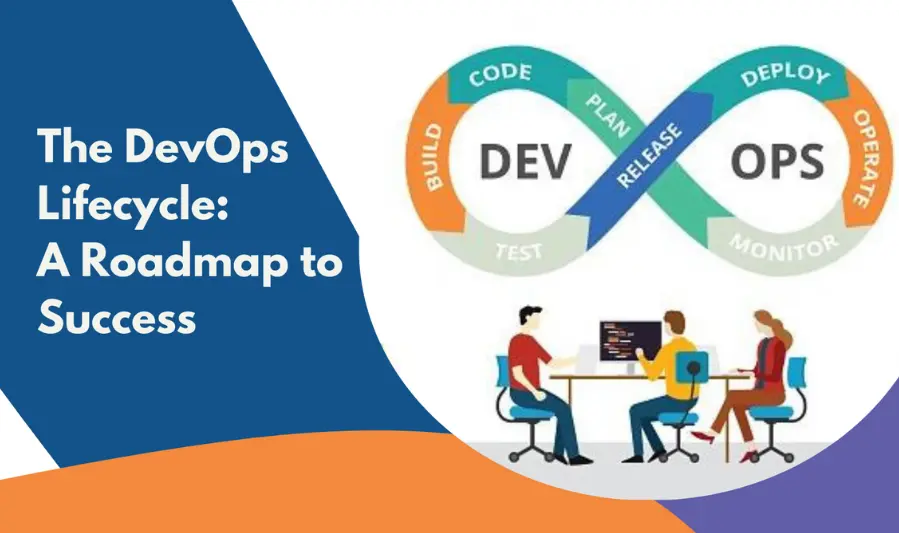
The DevOps lifecycle is a continuous loop of stages that help teams plan, build, test, release, deploy, and monitor software efficiently. Each phase is interconnected, ensuring faster delivery, improved quality, and seamless collaboration between development and operations teams.
1. Plan
In this stage, teams define project goals, requirements, and tasks.
Key Activities
- Creating user stories and task lists
- Prioritizing features and improvements
- Setting timelines and roadmaps
Tools
Jira, Trello, Azure DevOps Boards, ClickUp
2. Code
Developers write and manage the application’s source code.
Key Activities
- Writing clean, modular code
- Version controlling through Git
- Peer reviews and code collaboration
Tools
Git, GitHub, GitLab, Bitbucket
3. Build
Code is compiled and packaged into executable applications.
Key Activities
- Automated builds triggered by commits
- Checking dependencies and package versions
- Resolving build errors early
Tools
Jenkins, GitHub Actions, Maven, Gradle
4. Test
Automated testing ensures code quality and functionality.
Key Activities
- Running unit, integration, and end-to-end tests
- Identifying bugs early in the pipeline
- Ensuring stability before release
Tools
Selenium, JUnit, PyTest, TestNG
5. Release
The application is prepared for deployment and approved for production.
Key Activities
- Packaging the application
- Versioning and tagging
- Approvals for release
Tools
Jenkins, GitLab CI/CD, Spinnaker, Azure DevOps
6. Deploy
The software is deployed to production or staging environments.
Key Activities
- Automated deployment pipelines
- Ensuring zero-downtime releases
- Implementing rollback procedures
Tools
Docker, Kubernetes, AWS CodeDeploy, Argo CD
7. Monitor
Teams track application performance, logs, and errors after deployment.
Key Activities
- Monitoring application health
- Logging and alerting
- Continuous feedback for improvement
Tools
Prometheus, Grafana, ELK Stack, Datadog
Essential DevOps Automation Areas
3.1 CI/CD Automation
What CI/CD Is
Continuous Integration (CI) automates code building and testing whenever changes are committed.
Continuous Delivery/Deployment (CD) automates releasing applications to staging or production with minimal human intervention.
Tools for CI/CD
- Jenkins
- GitHub Actions
- GitLab CI/CD
- CircleCI
Setting Up a Basic CI/CD Pipeline
- Connect repository (GitHub/GitLab) to your CI tool
- Create a pipeline configuration file (e.g., Jenkinsfile, GitHub actions YAML)
- Define build, test, and deploy stages
- Run pipelines on every commit or pull request
- Monitor for errors and optimize steps
3.2 Testing Automation
Unit Testing
Tests individual functions or modules to ensure core logic works correctly.
Integration Testing
Verifies how different modules or services work together.
Automated Code Scanning
Performs static analysis to detect vulnerabilities, bugs, and code quality issues.
Tools for Automated Testing
- Selenium
- JUnit
- PyTest
- TestNG
- SonarQube (for code scans)
3.3 Infrastructure Automation (IaC)
Purpose of IaC
Infrastructure as Code (IaC) automates provisioning servers, networks, and cloud resources using scriptable templates—improving consistency, scalability, and speed.
Popular IaC Tools
- Terraform – cloud-agnostic infrastructure automation
- Ansible – configuration management + automation
- AWS CloudFormation – AWS-native IaC solution
Writing Simple Infrastructure Scripts
- Create a configuration file (e.g., Terraform
.tffile) - Define cloud resources (VMs, networks, storage)
- Run commands like
terraform init,plan, andapply - Version-control all infrastructure scripts for traceability
3.4 Deployment Automation
Container-Based Deployment (Docker)
Docker images ensure consistent application behavior across all environments.
Orchestration Using Kubernetes
Kubernetes automates:
- Scaling
- Load balancing
- Rollouts and rollbacks
- Self-healing applications
Zero-Downtime Deployment
Techniques like:
- Blue-green deployments
- Rolling updates
- Canary releases
Help avoid service interruptions during updates.
3.5 Monitoring & Logging Automation
Importance of Monitoring
Automated monitoring ensures systems remain healthy, prevents outages, and identifies performance issues early.
Popular Monitoring Tools
- Prometheus (metrics collection)
- Grafana (dashboard visualization)
- ELK Stack (Elasticsearch, Logstash, Kibana for logging)
- Datadog (full monitoring suite)
Automated Alerting
Alerts can trigger when:
- CPU or memory spikes
- Disk usage hits thresholds
- Services crash or behave abnormally
- Log errors exceed limits
Tools send alerts via email, Slack, SMS, or paging systems.
4. Best Practices for DevOps Automation
Start Small and Automate Step-by-Step
Begin with a simple workflow (build → test → deploy), then gradually extend automation across environments.
Use Version Control for Automation Scripts
Store Terraform files, Jenkins pipelines, Ansible playbooks, and other automation scripts in Git.
Ensure Security Automation (DevSecOps)
Integrate:
- Vulnerability scanning
- Secrets management
- Compliance checks
directly into pipelines.
Maintain Documentation
Keep clear documentation for:
- Pipelines
- IaC code
- Deployment processes
- Troubleshooting steps
Regularly Review and Improve Pipelines
Periodically analyze logs, performance metrics, and pipeline runs to identify bottlenecks and optimize.
Common Mistakes Beginners Should Avoid
Automating Everything at Once
Why This Is a Problem
Trying to automate every process from day one leads to complexity, errors, and overwhelming maintenance.
What to Do Instead
Start small, automate simple tasks, and scale slowly as you gain confidence.
Ignoring Testing
Why Testing Matters
Without proper testing, automated workflows may deploy broken code or cause unexpected failures.
Solution
Always include:
- Unit tests
- Integration tests
- Automated code scans
before deployment.
Not Securing Pipelines
Risks of Poor Security
Weak CI/CD security can expose credentials, deploy malicious code, or allow unauthorized changes.
Best Practices
- Use secrets management
- Implement role-based access control
- Run security scans (DevSecOps)
- Restrict pipeline triggers
Lack of Monitoring
Why Monitoring Is Essential
Without monitoring and alerts, failures may go unnoticed until they impact users.
Fix
Set up:
- Metrics dashboards
- Error alerts
- Log monitoring
- Health checks
Poor Documentation
Problems Caused by Missing Documentation
Team members can’t understand or troubleshoot pipelines, creating bottlenecks and mistakes.
Better Approach
Document:
- CI/CD pipelines
- IaC templates
- Deployment procedures
- Troubleshooting steps
You may also like to read these posts:
Beginner’s Guide to Managed IT Services for Smart Business Growth
Best Cloud Storage Options for Businesses & Individuals
Easy Core Java Tutorials for Beginners to Start Coding
System Architecture Design Tips for Building Better Systems
Recommended Tools for Beginners
1. CI/CD Tools
These tools help automate code integration, testing, and deployment.
Best Options
- GitHub Actions – Easy to start, built directly into GitHub
- GitLab CI/CD – Complete DevOps platform with pipelines included
- Jenkins – Highly customizable and widely used
- CircleCI – Cloud-based, fast, beginner-friendly
2. IaC (Infrastructure as Code) Tools
Infrastructure as Code helps automate provisioning of servers, networks, and cloud resources.
Best Options
- Terraform – Multi-cloud, beginner-friendly, declarative approach
- Ansible – Great for configuration management and automation
- AWS CloudFormation – Ideal for AWS-specific infrastructure
- Pulumi – Write IaC using real programming languages
3. Testing Automation Tools
These tools ensure code quality by running automated tests.
Best Options
- Selenium – Browser automation and UI testing
- JUnit / TestNG – Unit tests for Java
- PyTest – Popular testing framework for Python
- Postman/Newman – API testing automation
- SonarQube – Automated code quality and security scanning
4. Monitoring Tools
Monitoring tools track performance, logs, and application health.
Best Options
- Prometheus – Metrics and alerting
- Grafana – Dashboards for visualization
- ELK Stack (Elasticsearch, Logstash, Kibana) – Logging and search
- Datadog – All-in-one monitoring and logging
- New Relic – Full-stack observability
5. Security Automation Tools
Security tools help detect vulnerabilities and secure DevOps workflows.
Best Options
- Snyk – Scan open-source libraries for vulnerabilities
- Aqua Security – Container and cloud security
- Twistlock (Palo Alto Prisma Cloud) – Container & Kubernetes security
- HashiCorp Vault – Secrets management
- OWASP ZAP – Automated security testing for web apps
Roadmap for Beginners
Step-by-Step Learning Path
Step 1: Understand DevOps Basics
Learn what DevOps is, why it matters, and how it improves development and operations collaboration.
Step 2: Learn Version Control (Git & GitHub/GitLab)
Master basic Git commands, branching, merging, and pull requests.
Step 3: Practice CI/CD Concepts
Understand pipelines, automation, testing stages, and deployment workflows.
Step 4: Learn Containerization (Docker)
Build, run, and manage containers with Docker.
Step 5: Learn Orchestration (Kubernetes)
Understand pods, deployments, services, and cluster management.
Step 6: Learn Infrastructure as Code (Terraform/Ansible)
Automate server configuration and cloud resource provisioning.
Step 7: Learn Monitoring & Logging
Explore tools like Prometheus, Grafana, ELK/EFK stacks.
Step 8: Learn Cloud Platforms
Practice with AWS, Azure, or GCP to deploy real applications.
Skills to Develop
Technical Skills
- Git & version control
- Continuous integration & delivery
- Scripting (Bash, Python)
- Docker & Kubernetes
- Terraform / Ansible
- Cloud basics
- Monitoring and logs analysis
Soft Skills
- Collaboration
- Problem-solving
- Documentation
- Troubleshooting
Practice Projects
Beginner-Level Projects
- Create a simple CI pipeline with GitHub Actions
- Dockerize a basic web application
- Automate a simple task with a Bash or Python script
Intermediate Projects
- Build a full CI/CD pipeline with Jenkins or GitLab CI
- Deploy an application on Kubernetes
- Create Infrastructure as Code with Terraform
Advanced Projects
- Build a production-ready multi-stage pipeline
- Automate monitoring with Prometheus + Grafana
- Deploy a complete microservices application
Faqs:
What is DevOps automation?
DevOps automation refers to using tools and scripts to automate repetitive tasks in software development, such as building, testing, deploying, and monitoring applications.
Which tools should beginners use for DevOps automation?
Beginners can start with GitHub Actions or GitLab CI for CI/CD, Docker for containerization, Terraform for Infrastructure as Code, and Prometheus/Grafana for monitoring.
Is coding required to learn DevOps automation?
Yes, basic scripting knowledge (Bash, Python, YAML) helps, but many tools are beginner-friendly and provide templates to get started.
How can beginners avoid mistakes in DevOps automation?
Start small, automate one task at a time, document changes, monitor pipelines, and focus on security from day one.
What is the most important part of DevOps automation for beginners?
The most crucial part is setting up a simple and reliable CI/CD pipeline, as it forms the foundation for further automation in deployment, testing, and monitoring.
Conclusion
DevOps automation is the key to building faster, more reliable, and scalable software systems—especially for beginners who want to develop strong technical foundations. By starting with small tasks like CI/CD, testing, and basic infrastructure automation, you can gradually build a powerful workflow that saves time and reduces errors. With the right tools, continuous learning, and a step-by-step approach, anyone can master DevOps automation and grow into an efficient and confident DevOps engineer.