
Introduction to DevOps Pipelines
Definition and Purpose of a DevOps Pipeline
A DevOps pipeline is an automated workflow that takes code from development to production in a structured, repeatable, and reliable manner. It integrates multiple stages such as coding, building, testing, deployment, and monitoring to ensure that software is delivered efficiently and consistently.
Purpose:
- Streamline the software delivery process
- Ensure consistent and reliable deployments
- Reduce manual errors and bottlenecks
Benefits of a DevOps Pipeline
- Faster Delivery: Automates repetitive tasks, speeding up release cycles
- Fewer Errors: Early testing and automated checks catch bugs before deployment
- Improved Collaboration: Developers, testers, and operations teams work in a unified workflow
- Continuous Feedback: Immediate insights on code quality, build success, and application performance
Why Beginners Should Start with a Simple Pipeline
- Easier to Understand: A small pipeline helps beginners grasp the workflow without feeling overwhelmed
- Reduced Risk: Minimizes errors while learning automation
- Foundation for Scaling: Once comfortable, additional stages and complexity can be added gradually
- Hands-On Learning: Provides practical experience in CI/CD, testing, and deployment
Understanding the DevOps Lifecycle
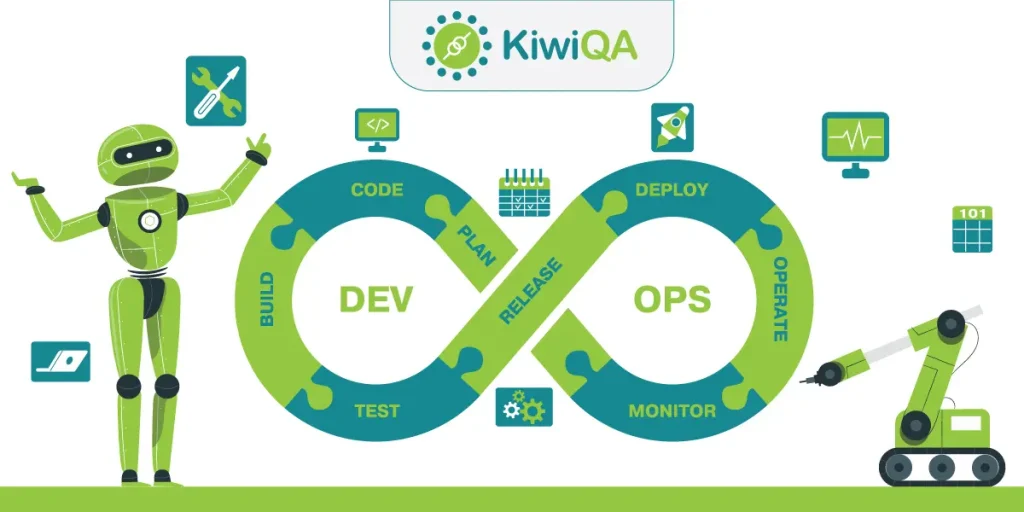
The DevOps lifecycle represents the continuous flow of activities that connect development and operations teams to deliver high-quality software efficiently. Automation plays a crucial role at every stage to speed up processes and reduce errors.
Key Phases of the DevOps Lifecycle
1. Plan
- Define project goals, requirements, and user stories
- Prioritize tasks and set milestones
- Automation Role: Use project management tools for automated task tracking and notifications
2. Code
- Write and manage application source code
- Collaborate via version control systems
- Automation Role: Integrate code quality checks and static analysis during commits
3. Build
- Compile and package code into executable applications
- Automation Role: Automated build pipelines ensure consistent, error-free builds
4. Test
- Run unit, integration, and end-to-end tests
- Automation Role: Automated testing detects bugs early and ensures code quality
5. Release
- Prepare the software for deployment
- Automation Role: Automate versioning, artifact creation, and deployment approvals
6. Deploy
- Deploy applications to staging or production environments
- Automation Role: Continuous Deployment pipelines enable faster and reliable rollouts
7. Monitor
- Track application performance, logs, and user behavior
- Automation Role: Automated monitoring and alerting detect issues before they impact users
How Each Phase Fits Into a Pipeline
Each phase is a linked stage in the CI/CD pipeline, where outputs from one stage feed automatically into the next. This integration ensures faster feedback loops, improved collaboration, and reduced manual intervention.
Importance of Automation at Each Stage
- Speeds up repetitive tasks
- Reduces human errors and inconsistencies
- Provides continuous feedback for improvements
- Enhances collaboration between development and operations
Key Components of a Beginner-Friendly Pipeline
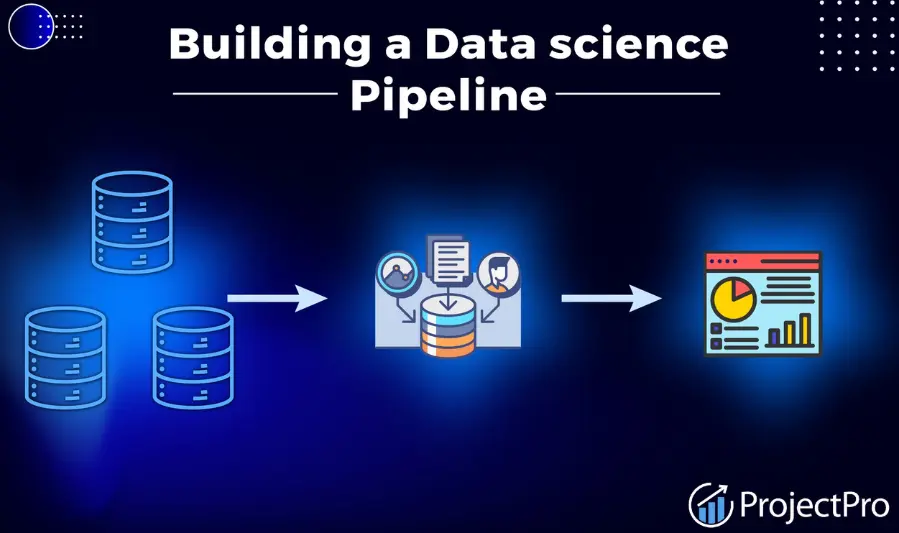
A beginner-friendly DevOps pipeline consists of interconnected stages that automate development, testing, deployment, and monitoring to ensure faster, reliable, and consistent software delivery.
3.1 Version Control
Importance of Version Control in CI/CD
Version control allows teams to manage changes in source code, collaborate effectively, and maintain a history of modifications for easy rollback if needed.
Tools
- Git
- GitHub
- GitLab
- Bitbucket
Branching Strategies and Collaboration
- Use feature branches for new development
- Implement pull requests for code reviews
- Merge to main/master branch only after successful CI tests
3.2 Continuous Integration (CI)
Automating Builds and Integration Tests
CI automates compiling code and running tests whenever new changes are committed, ensuring early detection of bugs.
Tools
- Jenkins
- GitHub Actions
- GitLab CI
- CircleCI
Benefits
- Detects bugs early
- Improves code quality
- Reduces integration issues
3.3 Automated Testing
Types of Tests
- Unit Tests: Test individual components
- Integration Tests: Verify modules work together
- Functional Tests: Check system behavior from a user perspective
Tools
- Selenium
- JUnit
- PyTest
- TestNG
Best Practices for Test Coverage
- Prioritize critical code paths
- Combine multiple test types for reliability
- Automate tests in CI pipelines
3.4 Continuous Deployment / Delivery (CD)
Difference Between Delivery and Deployment
- Continuous Delivery: Code is ready for deployment but requires manual approval
- Continuous Deployment: Code is automatically deployed to production after passing tests
Automating Deployment
- Deploy builds to staging first for validation
- Promote to production automatically or with approval
Tools
- Jenkins
- GitLab CI/CD
- Spinnaker
- AWS CodePipeline
Rollback Strategies and Zero-Downtime Deployment
- Implement blue-green or canary deployments
- Use automated rollback on failures
3.5 Infrastructure Automation
Infrastructure as Code (IaC)
IaC allows provisioning and managing servers, networks, and resources programmatically.
Tools
- Terraform
- Ansible
- CloudFormation
Benefits
- Reproducibility
- Version control
- Scalability
Managing Environments
- Maintain separate development, staging, and production environments
- Ensure consistent configuration across all environments
3.6 Monitoring and Logging
Importance of Monitoring for Pipeline Reliability
Monitoring ensures that pipelines and deployed applications run smoothly and any issues are detected early.
Tools
- Prometheus
- Grafana
- ELK Stack (Elasticsearch, Logstash, Kibana)
- Datadog
Automated Alerts and Feedback Loops
- Trigger alerts on failures, performance issues, or unusual behavior
- Use monitoring data to improve pipeline performance and reliability
Best Practices for Beginners in DevOps Automation
1. Start Small: Automate One Stage at a Time
- Focus on automating a single part of the pipeline (e.g., CI or testing)
- Gradually add more stages as you gain confidence
- Avoid overwhelming complexity in the initial setup
2. Use Version Control for All Scripts and Configurations
- Store CI/CD scripts, IaC templates, and configuration files in Git
- Enables easy tracking of changes, rollback, and collaboration
- Helps maintain consistency across environments
3. Maintain Clear Documentation
- Document pipeline structure, workflows, and automation scripts
- Include instructions for troubleshooting and updating
- Helps team members understand and maintain the pipeline
4. Regularly Review and Optimize the Pipeline
- Analyze pipeline performance and logs
- Identify bottlenecks or redundant steps
- Continuously improve for faster, more reliable deployments
5. Implement Security Early (DevSecOps Principles)
- Integrate security checks in CI/CD pipelines
- Use automated vulnerability scanning and secrets management
- Ensure compliance with organizational and regulatory standards
Common Mistakes to Avoid in DevOps Automation
1. Automating Everything at Once
- Attempting to automate all stages from the start can create complexity and errors
- Better Approach: Start with one stage (e.g., CI) and gradually add more
2. Skipping Testing or Monitoring
- Neglecting automated tests or monitoring can lead to undetected bugs and system failures
- Better Approach: Integrate automated testing and monitoring early in the pipeline
3. Poor Documentation
- Lack of clear documentation makes it difficult for teams to understand or maintain pipelines
- Better Approach: Document workflows, scripts, and troubleshooting steps
4. Ignoring Security
- Overlooking DevSecOps practices exposes pipelines to vulnerabilities and breaches
- Better Approach: Include automated security checks, secret management, and compliance scans
5. Lack of Rollback or Recovery Strategies
- Failing to plan for failures can result in downtime or data loss
- Better Approach: Implement rollback mechanisms, blue-green deployments, and automated recovery plans
Recommended Tools for Beginners in DevOps Automation
1. CI/CD Tools
Automate code integration, testing, and deployment:
- Jenkins – Highly customizable, widely used
- GitHub Actions – Easy integration with GitHub repositories
- GitLab CI/CD – Complete DevOps platform with pipelines
- CircleCI – Cloud-based, beginner-friendly
2. Containers
Ensure consistent environments and simplify deployments:
- Docker – Build, run, and manage containers
- Kubernetes – Orchestrate containers, manage scaling, and deployments
3. Testing Tools
Automate testing to improve code quality and catch errors early:
- Selenium – Browser automation and UI testing
- PyTest – Python testing framework
- JUnit – Unit testing for Java applications
- TestNG – Advanced testing for Java
4. Monitoring Tools
Track performance, logs, and application health:
- Prometheus – Metrics collection and alerting
- Grafana – Visual dashboards for metrics
- ELK Stack (Elasticsearch, Logstash, Kibana) – Logging and search for monitoring
- Datadog – Full-stack monitoring and analytics
5. Infrastructure as Code (IaC) Tools
Automate infrastructure provisioning and management:
- Terraform – Multi-cloud, declarative IaC
- Ansible – Configuration management and automation
- CloudFormation – AWS-native IaC solution
- Pulumi – Write IaC using real programming languages
You may also like to read these posts:
Beginner’s Guide to Managed IT Services for Smart Business Growth
Best Cloud Storage Options for Businesses & Individuals
Easy Core Java Tutorials for Beginners to Start Coding
System Architecture Design Tips for Building Better Systems
Roadmap for Beginners in DevOps Automation
A structured roadmap helps beginners build DevOps skills step-by-step while gaining practical experience.
Step-by-Step Learning Path
1. Version Control
- Learn Git basics: commit, branch, merge
- Practice with GitHub or GitLab repositories
- Understand collaboration workflows (pull requests, code reviews)
2. CI/CD Basics
- Understand Continuous Integration and Continuous Deployment
- Learn to set up simple pipelines with Jenkins, GitHub Actions, or GitLab CI/CD
- Automate build, test, and deployment stages
3. Automated Testing
- Learn unit, integration, and functional tests
- Practice automated testing with Selenium, PyTest, or JUnit
- Integrate tests into CI pipelines for early bug detection
4. Containerization
- Learn Docker basics: images, containers, and Dockerfile
- Practice containerizing simple applications
- Explore orchestration with Kubernetes (pods, deployments, services)
5. Monitoring and Feedback
- Understand the importance of monitoring application performance
- Learn tools like Prometheus, Grafana, and ELK Stack
- Set up automated alerts and feedback loops for pipelines
6. Practice Projects and Tutorials
- Build a simple CI/CD pipeline for a small project
- Containerize and deploy an application
- Automate testing and monitoring for your project
- Explore cloud platforms like AWS, Azure, or GCP for real-world practice
Skills to Develop Along the Roadmap
- Git & version control
- CI/CD pipeline configuration
- Automated testing integration
- Docker & Kubernetes basics
- Infrastructure as Code (Terraform, Ansible)
- Monitoring, logging, and alerting
Faqs:
What is a DevOps pipeline?
A DevOps pipeline is an automated process that manages the software lifecycle, including building, testing, deploying, and monitoring applications for faster and more reliable delivery.
What are the main stages of a beginner-friendly DevOps pipeline?
The main stages are code commit, continuous integration (CI), automated testing, continuous deployment/delivery (CD), infrastructure automation, and monitoring/feedback.
Which tools are best for beginners to build a DevOps pipeline?
Beginner-friendly tools include Git, GitHub Actions, GitLab CI/CD, Jenkins, Docker, Kubernetes, Prometheus, Grafana, Terraform, and Ansible.
How can beginners start implementing a DevOps pipeline?
Start with version control and small CI/CD pipelines, gradually add automated testing, deployment, and monitoring, and continuously improve the workflow.
Why is monitoring important in a DevOps pipeline?
Monitoring ensures applications and pipelines run smoothly, detects issues early, and provides feedback for continuous improvement and reliability.
Conclusion
A beginner-friendly DevOps pipeline helps newcomers automate the software development lifecycle, making builds, tests, and deployments faster, more reliable, and consistent. By understanding and implementing each stage—code commit, CI, automated testing, CD, infrastructure automation, and monitoring—beginners can establish a strong foundation in DevOps. Starting small, following best practices, and continuously improving workflows ensures scalable, efficient, and error-free software delivery.