

Introduction
What Cloud System Architecture Means
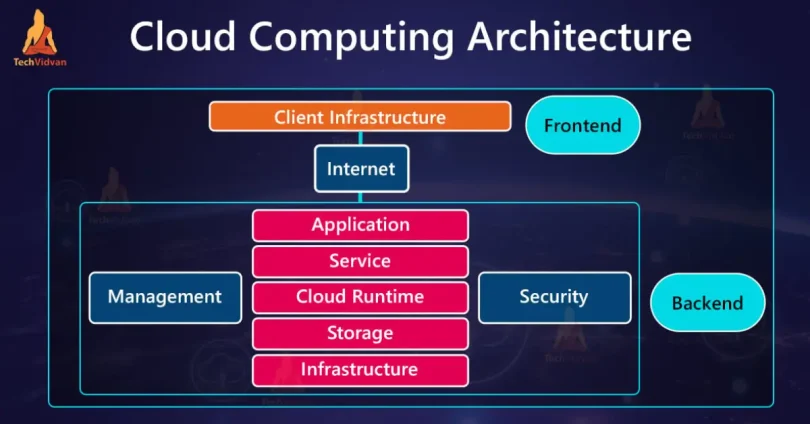
Cloud system architecture refers to the design and organization of components that run applications and services in the cloud. It defines how servers, storage, databases, networking, and software work together to deliver scalable, reliable, and secure cloud-based solutions.
Why Cloud Architecture Is Important Today
Cloud architecture is essential because modern applications and businesses demand:
- Scalability: Easily handle growing workloads and traffic spikes
- Reliability: Ensure continuous availability and minimal downtime
- Cost-efficiency: Pay only for the resources you use
- Flexibility: Quickly deploy new services and updates
Who This Tutorial Is For
This guide is suitable for:
- Beginners learning cloud computing fundamentals
- Students studying IT, computer science, or cloud technologies
- IT Professionals exploring cloud architecture design and best practices
Understanding Cloud System Architecture
Simple Definition
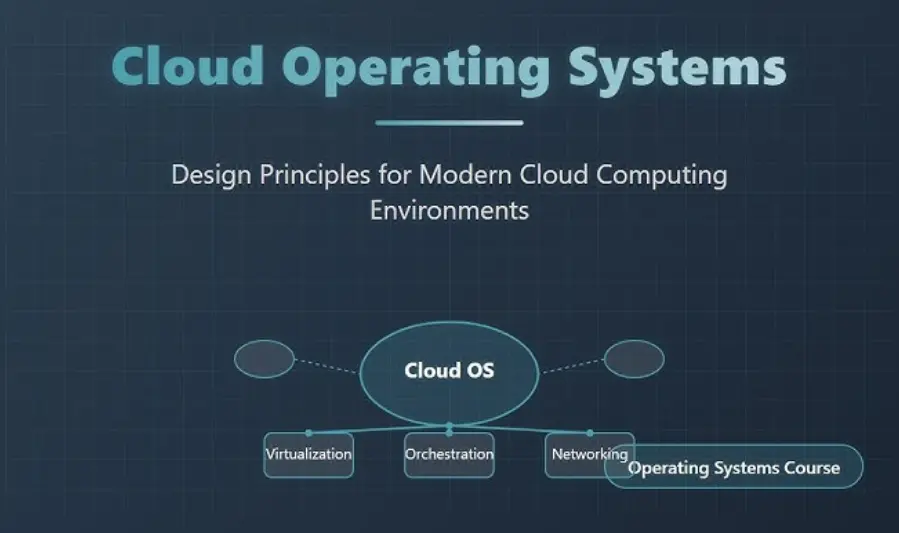
Cloud system architecture is the structured design of applications, services, and infrastructure that run in cloud environments. It shows how servers, storage, databases, networking, and software interact to deliver reliable, scalable, and flexible cloud solutions.
Role of Cloud Providers
Cloud providers like AWS, Azure, and Google Cloud offer the infrastructure, platforms, and services needed to deploy and manage cloud applications. Their role includes:
- Providing compute, storage, and networking resources
- Ensuring security and compliance
- Offering managed services for databases, analytics, and AI
- Enabling auto-scaling and high availability
Comparison With Traditional On-Premises Architecture
| Feature | On-Premises | Cloud Architecture |
|---|---|---|
| Infrastructure | Owned and managed by organization | Managed by cloud provider |
| Scalability | Limited by physical hardware | Easy horizontal and vertical scaling |
| Cost | High upfront capital expenses | Pay-as-you-go model |
| Maintenance | Requires internal IT team | Managed by provider |
| Deployment Speed | Slower due to manual setup | Faster with automation and templates |
Cloud architecture offers flexibility, scalability, and cost savings compared to traditional on-premises systems.
Key Components of Cloud Architecture
3.1 Compute Layer
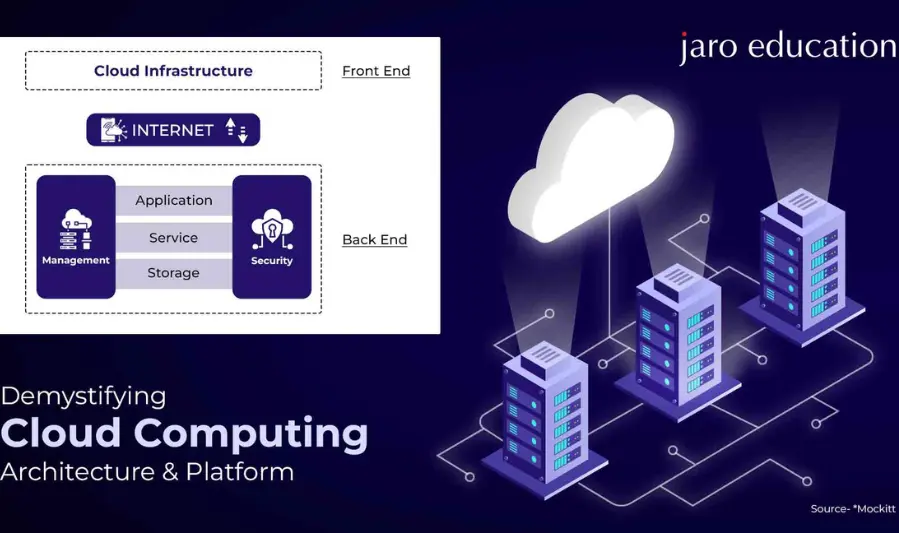
The compute layer provides the processing power needed to run applications and services in the cloud.
Virtual Machines
- Full-featured servers that emulate physical machines
- Suitable for legacy applications and custom configurations
Containers
- Lightweight, portable units that package applications and dependencies
- Enables consistent deployment across environments
Serverless Functions
- Event-driven execution without managing servers
- Auto-scales based on demand, cost-efficient
3.2 Storage Layer
Cloud storage provides data persistence, backup, and accessibility for applications.
Object Storage
- Stores unstructured data like images, videos, and documents
- Examples: AWS S3, Azure Blob Storage
Block Storage
- High-performance storage attached to virtual machines
- Suitable for databases and transaction-heavy applications
File Storage
- Shared file systems accessible over network protocols
- Examples: Amazon EFS, Azure File Storage
3.3 Networking Layer
The networking layer connects cloud resources and ensures secure, reliable communication.
Virtual Networks
- Isolated networks for cloud resources
- Enable private communication and segmentation
Load Balancers
- Distribute incoming traffic across multiple servers
- Ensure high availability and performance
Network Security
- Firewalls, gateways, and VPNs protect cloud resources from unauthorized access
3.4 Database Layer
The database layer manages structured and unstructured data efficiently.
SQL Databases
- Relational databases with fixed schemas
- Examples: Amazon RDS, Azure SQL Database
NoSQL Databases
- Flexible schema for unstructured or semi-structured data
- Examples: MongoDB, DynamoDB
Distributed Databases
- Data is replicated and partitioned across multiple nodes
- Supports high availability and large-scale workloads
3.5 Application Layer
This layer hosts the applications and services that users interact with.
Web Apps
- Cloud-hosted applications accessible through browsers
APIs
- Enable communication between services and external systems
Microservices
- Independent, modular services that can scale individually
3.6 Management & Monitoring
Management and monitoring tools ensure cloud resources are optimized, secure, and reliable.
Cloud Monitoring Tools
- Track performance, usage, and availability
- Examples: AWS CloudWatch, Azure Monitor
Automation Services
- Automate deployment, scaling, and resource management
- Examples: Terraform, AWS CloudFormation
Resource Management
- Manage cloud resources efficiently to reduce cost and optimize performance
Types of Cloud Architecture
4.1 Public Cloud
Public cloud services are offered by third-party providers over the internet and are shared among multiple organizations.
Key Features
- Resources are hosted and managed by providers like AWS, Azure, or Google Cloud
- Pay-as-you-go pricing model
- Easy scalability and global accessibility
Use Cases
- Startups and small businesses
- Web applications and SaaS platforms
- Testing and development environments
4.2 Private Cloud
Private cloud is dedicated to a single organization and can be hosted on-premises or by a third-party provider.
Key Features
- Provides full control over infrastructure and data
- Higher security and compliance
- Customizable hardware and software configuration
Use Cases
- Enterprises with strict regulatory requirements
- Financial institutions
- Healthcare systems
4.3 Hybrid Cloud
Hybrid cloud combines public and private cloud environments, allowing data and applications to move between them.
Key Features
- Flexible workload placement
- Balances cost efficiency and security
- Supports gradual cloud adoption
Use Cases
- Large enterprises with sensitive and non-sensitive workloads
- Disaster recovery solutions
- Seasonal or fluctuating workloads
4.4 Multi-Cloud
Multi-cloud architecture uses services from multiple cloud providers simultaneously.
Key Features
- Avoids vendor lock-in
- Optimizes performance and cost
- Increases redundancy and availability
Use Cases
- Global organizations requiring regional optimization
- High-availability systems
- Workloads leveraging specialized services from different providers
How Cloud Architecture Works (Step-by-Step)
User Request Flow
The process starts when a user interacts with a cloud-hosted application.
Steps
- The user sends a request via a browser, mobile app, or API call.
- The request is routed over the internet to the cloud provider’s network.
- Security layers (firewalls, gateways) inspect the request before it reaches the application.
Load Balancing
Load balancers distribute incoming requests across multiple servers to ensure optimal performance and availability.
Key Functions
- Prevents any single server from becoming overloaded
- Routes traffic to the healthiest servers
- Supports horizontal scaling by adding more compute instances
Compute Processing
Once a request reaches the application servers, cloud compute resources handle the processing.
Processing Steps
- Application logic executes in virtual machines, containers, or serverless functions
- Tasks may involve data computation, file processing, or API interactions
- Microservices may handle specific parts of the request independently
Database Interaction
Most cloud applications rely on databases to store and retrieve information.
How It Works
- The application server queries SQL or NoSQL databases
- Data may be read from storage or retrieved from a cache for faster response
- Databases may be distributed across multiple nodes for high availability
Delivering the Response
After processing, the application generates a response and sends it back to the user.
Steps
- Response data is formatted (JSON, HTML, or XML)
- Routed back through load balancers and security layers
- Delivered to the user’s device, completing the request cycle
You may also like to read these posts:
Beginner’s Guide to Managed IT Services for Smart Business Growth
Best Cloud Storage Options for Businesses & Individuals
Easy Core Java Tutorials for Beginners to Start Coding
System Architecture Design Tips for Building Better Systems
Cloud Architecture Models
1. 3-Tier Cloud Architecture
The 3-tier model separates the system into three layers: presentation, application, and data.
Components
- Presentation Layer: User interface (web or mobile apps)
- Application Layer: Business logic and processing
- Data Layer: Database servers and storage
Benefits
- Clear separation of concerns
- Easier maintenance and scaling
- Supports modular development
2. Microservices Cloud Architecture
Microservices architecture divides applications into small, independent services that communicate via APIs.
Features
- Each service handles a specific function
- Can be deployed, updated, and scaled independently
Benefits
- Improved scalability and fault isolation
- Faster deployment cycles
- Supports diverse technologies per service
3. Serverless Cloud Architecture
Serverless architecture allows developers to run code without managing servers.
Features
- Functions executed on demand
- Automatic scaling based on workload
Benefits
- Cost-efficient (pay only for execution time)
- Reduces infrastructure management
- Ideal for event-driven tasks and APIs
4. Event-Driven Architecture
Event-driven architecture reacts to events or messages to trigger workflows or processing.
Components
- Event Producers: Generate events (user actions, IoT devices, external APIs)
- Event Consumers: Services or functions that process the events
- Event Bus/Queue: Routes events to consumers
Benefits
- Enables asynchronous processing
- Supports high-volume workloads
- Decouples services for better scalability and resilience
Cloud Deployment Models
1. IaaS (Infrastructure as a Service)
IaaS provides virtualized computing resources over the internet, giving users control over servers, storage, and networking.
Key Features
- Users manage OS, applications, and data
- Provider manages physical hardware and virtualization
- Flexible scaling and pay-as-you-go pricing
Examples
- Amazon EC2 (AWS)
- Microsoft Azure Virtual Machines
- Google Compute Engine
2. PaaS (Platform as a Service)
PaaS delivers a platform for developers to build, deploy, and manage applications without worrying about underlying infrastructure.
Key Features
- Managed runtime environment, databases, and development tools
- Simplifies deployment and scaling of applications
- Developers focus on coding and business logic
Examples
- AWS Elastic Beanstalk
- Microsoft Azure App Service
- Google App Engine
Faqs:
What is cloud system architecture?
Cloud system architecture is the design and structure of cloud-based systems that organize compute, storage, networking, and application components to deliver scalable and reliable services.
Why is cloud architecture important for businesses?
Cloud architecture enables businesses to scale resources on demand, reduce infrastructure costs, improve reliability, and provide secure access to applications globally.
What are the main components of cloud architecture?
The main components include the compute layer (VMs, containers, serverless), storage layer, networking layer, database layer, application layer, and management/monitoring tools.
What are the types of cloud architecture?
Common types include public cloud, private cloud, hybrid cloud, and multi-cloud architectures, each offering different levels of control, cost, and flexibility.
Can beginners learn cloud system architecture without prior experience?
Yes. Beginners can start with free cloud tiers, simple architecture diagrams, and tutorials to understand key concepts before moving on to more advanced deployments.
Conclusion
Cloud system architecture is the backbone of modern digital applications, enabling scalability, reliability, and cost-efficiency. By understanding the key components, architecture types, and workflows, beginners and IT professionals can design and deploy cloud solutions effectively. Learning cloud architecture provides the foundation to build flexible, high-performing systems that meet today’s dynamic business and technology demands.


