
Introduction to DevOps Workflows
Definition and Purpose of DevOps
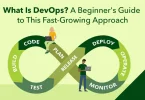
DevOps is a methodology that integrates software development (Dev) and IT operations (Ops) to streamline the software lifecycle. DevOps workflows provide structured processes for automation, monitoring, and management of development and deployment activities.
Key Objectives:
- Shorten development cycles
- Deliver high-quality software consistently
- Enhance collaboration between teams
Importance of Workflows in DevOps
Workflows in DevOps help teams operate efficiently and avoid bottlenecks.
How Workflows Help:
- Automate repetitive tasks like testing, deployment, and monitoring
- Ensure predictable and consistent delivery of software
- Align development, operations, and QA teams toward common goals
Benefits of DevOps Workflows
Implementing structured DevOps workflows offers multiple advantages:
1. Faster Software Delivery
- Continuous integration (CI) and continuous deployment (CD) accelerate release cycles
2. Higher Quality
- Automated testing and monitoring catch bugs early and improve reliability
3. Reduced Errors
- Standardized procedures minimize human mistakes during deployment
4. Improved Collaboration
- Clear workflows enhance communication and coordination across teams
Step 1: Planning

Agile Methodologies
Planning in DevOps often follows Agile principles to ensure flexibility and iterative progress.
Key Concepts:
- Sprints: Short development cycles with defined deliverables
- Backlogs: Ordered list of tasks, features, or bug fixes
- User Stories: Descriptions of software features from an end-user perspective
Task Prioritization and Milestone Setting
- Identify high-priority tasks that deliver the most value
- Define milestones to track progress and maintain deadlines
- Adjust priorities dynamically based on feedback and changes
Tools for Planning
- Jira: Popular tool for Agile project management and tracking
- Trello: Visual task boards for team collaboration
- Azure DevOps Boards: Integrated planning and work-tracking solution
Best Practices
- Maintain a clear roadmap with defined objectives
- Conduct frequent reassessment to adapt to changes and blockers
- Ensure alignment between development
Step 2: Coding / Development
Version Control Systems (VCS)
Version control is essential for tracking code changes, collaboration, and maintaining code history.
Popular Tools:
- Git: Distributed version control system
- GitHub: Cloud-based Git repository hosting
- GitLab: Git repository with integrated CI/CD pipelines
- Bitbucket: Git-based collaboration platform
Code Collaboration
Collaboration ensures code quality and team alignment.
Key Practices:
- Pull Requests (PRs): Submit code changes for review before merging
- Code Reviews: Peer review to catch errors, enforce standards, and share knowledge
Best Practices for Development
- Write modular code for easier maintenance and testing
- Follow coding standards to ensure consistency across the team
- Perform testing during development, including unit tests and integration tests
- Document code clearly for future reference and team understanding
Step 3: Continuous Integration (CI)
Purpose of Continuous Integration
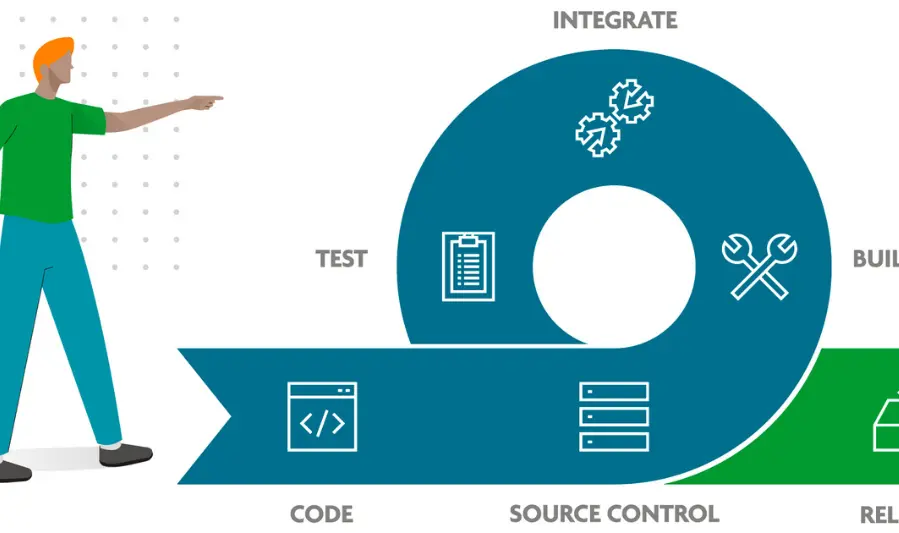
Continuous Integration (CI) automates the process of building and testing code to detect errors early and ensure code quality before deployment.
Key CI Activities
- Automating Builds: Automatically compile and package code whenever changes are pushed
- Running Tests: Execute unit tests, integration tests, and regression tests to validate functionality
- Feedback Loops: Provide instant notifications on build or test failures
Popular CI Tools
- Jenkins: Open-source automation server for builds and testing
- GitHub Actions: CI/CD workflows integrated within GitHub repositories
- GitLab CI: Integrated CI/CD in GitLab for automated pipelines
- CircleCI: Cloud-based CI tool for rapid build and test automation
Best Practices for CI
- Integrate code frequently to reduce merge conflicts
- Detect bugs early in the development cycle
- Automate all tests to ensure consistent validation
- Keep build times short to maintain developer productivity
Step 4: Continuous Deployment / Delivery (CD)
Continuous Delivery vs Continuous Deployment
- Continuous Delivery (CD): Code changes are automatically prepared for release to production but require manual approval before deployment.
- Continuous Deployment: Code changes are automatically deployed to production after passing automated tests, without manual intervention.
Automating Deployment Pipelines
Deployment pipelines automate moving code from development to staging and production environments, ensuring consistent and reliable releases.
Key Activities:
- Build and package the application
- Run automated tests and quality checks
- Deploy to staging for final validation
- Deploy to production with minimal downtime
Popular CD Tools
- Jenkins: Supports automated build, test, and deployment pipelines
- Spinnaker: Multi-cloud continuous delivery platform
- GitLab CI/CD: Integrated pipelines for both CI and CD
- AWS CodePipeline: Cloud-based automation for CI/CD workflows
Best Practices for CD
- Implement automated rollback strategies in case of failures
- Ensure minimal downtime during production deployments
- Test in staging or production-like environments before full deployment
- Continuously monitor deployments for errors and performance
You may also like to read these posts:
Beginner’s Guide to Managed IT Services for Smart Business Growth
Best Cloud Storage Options for Businesses & Individuals
Easy Core Java Tutorials for Beginners to Start Coding
System Architecture Design Tips for Building Better Systems
Step 5: Infrastructure as Code (IaC)
Concept of Infrastructure as Code
Infrastructure as Code (IaC) is the practice of managing and provisioning computing infrastructure through machine-readable configuration files rather than manual processes. This approach allows teams to automate and version their infrastructure similarly to application code.
Popular IaC Tools
- Terraform: Declarative tool for building, changing, and versioning infrastructure across multiple cloud providers
- Ansible: Configuration management tool for automating server setups and deployments
- CloudFormation: AWS-specific IaC service for defining cloud resources in JSON or YAML templates
Benefits of IaC
- Reproducibility: Infrastructure can be recreated consistently across environments
- Version Control: Track changes, review updates, and roll back infrastructure like application code
- Scalability: Easily scale resources up or down through automated scripts
- Consistency: Minimizes human error by standardizing setups
Best Practices for IaC
- Write modular infrastructure code to reuse templates across projects
- Implement code reviews for IaC scripts to catch errors early
- Maintain version control and document infrastructure changes
- Test infrastructure in isolated or staging environments before production deployment
Faqs:
What is a DevOps workflow?
A DevOps workflow is a structured process that integrates development, testing, deployment, and operations to deliver software efficiently and reliably.
What are the main steps in a simple DevOps workflow?
The main steps include planning, coding/development, continuous integration (CI), continuous deployment/delivery (CD), infrastructure as code (IaC), monitoring/logging, and collaboration/feedback.
Which tools are commonly used in DevOps workflows?
Common tools include Git, GitHub, GitLab, Jenkins, CircleCI, Terraform, Ansible, Prometheus, Grafana, and Slack.
What is the difference between CI and CD in DevOps?
CI (Continuous Integration) automatically builds and tests code changes, while CD (Continuous Delivery/Deployment) automates deployment to staging or production environments.
How can beginners start practicing DevOps workflows?
Beginners can start with small projects, use version control systems, set up basic CI/CD pipelines, practice automation with IaC, and gradually explore monitoring and collaboration tools.
Conclusion
A simple DevOps workflow helps teams deliver software faster, reliably, and efficiently by integrating development and operations processes. By following structured steps—planning, coding, CI/CD, infrastructure as code, monitoring, and collaboration—beginners can understand the core principles of DevOps. Implementing these workflows promotes automation, reduces errors, and fosters continuous improvement, laying a strong foundation for advanced DevOps practices.